
How Do I Create a New GoDaddy Email Account?
Creating a new Godaddy Webmail is straight forward and takes only a few minutes.
Follow our step-by-step tutorial and you will have signed up for an email account in no time, avoiding the most common sign up and log in problems.
Godaddy has labeled their email service “Workspace Webmail”.
Create a Godaddy Account Before Signing Up for an Email Address.
To sign up for GoDaddy Email you must already have an active GoDaddy account. If you don’t have a Godaddy Account, you can sign up for one for free at https://sso.godaddy.com/account/create.
You can create a Godaddy Account with your Facebook account or with an existing email address.
Creating a Godaddy Webmail Account.
- Log in to your Godaddy account and click on the ‘Workspace Email’ tab.
- Locate the account you want to use and click on the ‘Manage’ tab.
- Choose ‘Create’ at the top.
- Enter the email address you want to have to have, for example: [email protected]
- Choose a email password for your new account. The password must not contain special characters, such as -,+, %, &, $, or *. Enter the password twice.
- Click on ‘Create’. You should then see a message: “Congratulations!” and you will receive a confirmation email with instruction on how to set up compatible email client software on your home computer or your mobile phone.
If you want setup an email client yourself, click on Workspace Email.
Choose “Email Setup Center” and click on “Get Started”. The Email Setup Wizard will open Just follow up the instructions to setup an email client for a Mobile or a Desktop.
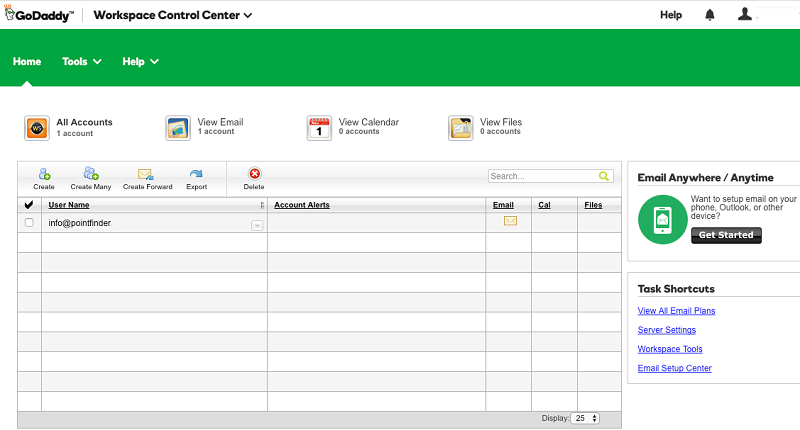
Click on the “Create” tab to create a email account.
Create more than 1 Godaddy Email Addresses.
If you want to create extra email addresses associated with the same domain, repeat the process. Your Godaddy Package will indicate how many extra webmail addresses you can create.
Occacisonally, it can take up to 90 minutes for a new Godaddy Webmail account to become active.
How to Sign In to your New Godaddy Webmail Account.
Once you have created your Email Account, go to https://email.godaddy.com/ to sign in.
An alternative Godaddy Webmail login page can be found here. (Mobile-Optimized).
You can also check your Workspace email using email.yourdomain.com (substituting yourdomain.com for your own web domain name).
If you have problems signing in, visit the Godaddy Email Login Troubleshooting page.