
Email Settings

Email Settings – SMTP, IMAP and POP3 Settings

Menu
  • Server Settings
    • Yahoo Mail IMAP Server Settings
    • Yahoo Mail SMTP Server Settings
    • Yahoo Mail POP3 Server Settings
    • Hotmail POP3 Server Settings
    • Hotmail SMTP Server Settings
    • Hotmail IMAP Settings
    • Gmail POP3 Server Settings
    • Gmail SMTP Server Settings
    • Gmail IMAP Settings
    • Charter Server Settings
  • Contact Us
  • Privacy Policy

Create New Facebook Account

November 30, 2021
| No Comments

How to Create a New Facebook Account.

In order to make use of Facebook, the first step is to create a Facebook account.

This can be carried out from the main homepage ( www.facebook.com ) or from within the dedicated mobile app, which is available for Android and iOS devices.

The main sign up form is present on the homepage, under the heading ‘Create a New Account’.

You can also go directly to Facebook’s dedicated Sign Up page, but it basically has the same form as the homepage

On this form, you will need to enter the following information:

  • Your Name
  • Your Mobile Number or Email Address
  • Your Password
  • Your Date of Birth
  • Your Gender

You must use a valid email address or mobile phone number, as you will need to use whichever of these you provide to verify your account creation. If you opt to use a mobile number and you receive an error message when signing up, make sure you have included the area code for your country. If it still fails, use an email address instead.
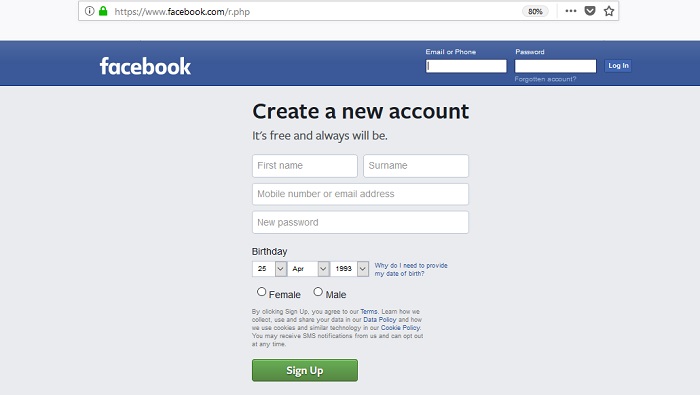
facebook sign up. Create a Facebook account

The Facebook Sign Up page looks like this screenshot. Fill out all the fields to create an account.

Please note, that your Facebook password must be atleast 6 characters long.

Once you have entered all of this information, click on the ‘Create Account’ button and follow the instructions to complete the sign up process and create your new account.

It is worth noting that Facebook is completely free to join, but you must be at least 13 years old in order to create a Facebook account and use the platform. This minimum age is now standardised for most users around the world, but may vary in some countries.


Can I Create more than one Facebook Account?

Facebook doesn’t allow users to have two or more personal accounts, as it is against their Terms of Service. If they find out that you have two personal accounts, they can shut them down.

However, of course it is possible to create more than one Facebook account for your own use. See out Second Facebook Account page for a full guide.

If you still cannot sign up for a Facebook account, then state your problem in the comment section below this page.

Create Account, Facebook, How To Tutorials
| Tags: create Facebook account, Facebook Sign Up, New Facebook account

Post navigation

Yahoo Mail IMAP Server Settings
Create a Second Facebook Account

Leave a Reply Cancel reply

Your email address will not be published. Required fields are marked *

Email Server Settings

  • Yahoo Mail IMAP Settings
  • Yahoo Mail SMTP Settings
  • Yahoo Mail POP3 Settings
  • Hotmail POP3 Server Settings
  • Hotmail SMTP Server Settings
  • Hotmail IMAP Settings
  • Gmail POP3 Server Settings
  • Gmail SMTP Server Settings
  • Gmail IMAP Settings

Categories

  • AOL Mail
  • Att.net Email
  • Charter.net Email
  • Create Account
  • Email Passwords
  • Email Security
  • Facebook
  • Free Email Accounts
  • Gmail
  • Godaddy Email
  • Google Account
  • Hotmail
  • Hotmail Account
  • Hotmail Sign In
  • How To Tutorials
  • iCloud Email
  • Login
  • Outlook 365
  • Roadrunner Email
  • Server Settings
  • Sign Up
  • TWC Time Warner Cable Email
  • Verizon Email
  • Yahoo Mail

Recent Comments

  • Stanley Peters on Create a Outlook 365 Account
  • Michael Dobbie on AOL.com Mail Login
  • Ginelly Santos on G.co Recover
  • петро і максим on Hotmail IMAP Settings
  • Kevin Tomczyk on Gmail SMTP Server Settings

© Email Settings 2026. Powered by WordPress